프로젝트 설명 : 대나무숲
- Django-backend : API 호출 ( 글 저장 / 글 가져오기 / 글 삭제)
- React-Frontend : 간단한 글 쓰기 및 보여주기 , 삭제
- Axios : http 통신 (비동기 통신)
Install 필요한 패키지 설치
1
2
| pip install django-restframework
pip install django-cors-headers
|
Run DB 마이그래이션
1
2
3
| python manage.py makemigrations
python manage.py migrate
python manage.py runserver
|
BACKEND API명세
| URL |
METHOD |
Description |
Params |
Return |
| /api/posts |
GET |
전체 글을 조회합니다. |
|
[…{Post}] |
| /api/posts |
POST |
새로운 글을 작성합니다. |
|
{Post} |
| /api/posts/[id] |
GET |
특정 ID의 글을 조회합니다. |
|
{Post} |
| /api/posts/[id] |
DELETE |
특정 ID의 글을 삭제합니다. |
|
|
React app 생성
1
2
3
4
5
| npx create-react-app reactfrontend
npm start
npm install axios
|
React App에 src/api.js 생성
1
2
3
4
5
6
7
8
9
10
11
12
13
14
15
16
17
18
19
20
21
22
|
import axios from "axios"
axios.defaults.baseURL = "http://127.0.0.1:8000/api"
export default {
getAllPosts(){
return axios.get('/posts/')
}
,
createPost(data){
return axios.post('/posts/', data)
},
deletePost(id){
return axios.delete('/posts/'+String(id))
},
}
|
글을 써주고 삭제할수 있게 해주는 PostView.js 컴포넌트 작성
1
2
3
4
5
6
7
8
9
10
11
12
13
14
15
16
17
18
19
| import React, {Component} from 'react'
export default class PostView extends Component{
render(){
const {id, title, content} = this.props
return(
<div>
{id}
<h3>{title}</h3>
<p>{content}</p>
</div>
)
}
}
|
app.js -> index.js main 컴포넌트인 App.js 작성
1
2
3
4
5
6
7
8
9
10
11
12
13
14
15
16
17
18
19
20
21
22
23
24
25
26
27
28
29
30
31
32
33
34
35
36
37
38
39
40
41
42
43
44
45
46
47
48
49
50
51
52
53
54
55
56
57
58
59
60
61
62
63
64
65
66
67
68
69
70
71
72
73
74
75
76
77
78
79
| import React from 'react';
import './App.css';
import api from './api';
import PostView from './Components/PostView'
class App extends React.Component {
constructor(props){
super(props)
this.state = {
title: '',
content: '',
results: [],
}
}
componentDidMount(){
this.getPosts()
}
async getPosts(){
const _results = await api.getAllPosts()
this.setState({results: _results.data})
console.log(_results)
}
handlingChange = (event)=> {
this.setState({[event.target.name]: event.target.value})
}
handlingSubmit = async (event) => {
event.preventDefault()
let result = await api.createPost({title: this.state.title, content: this.state.content})
console.log("완료! "+ result)
this.setState({title: '', content: ''})
this.getPosts()
}
handlingDelete = async (event) => {
await api.deletePost(event.target.value)
this.getPosts()
}
render(){
return (
<div className="App">
<div className="PostingSection">
<h2>대나무 숲 작성하기</h2>
<form onSubmit={this.handlingSubmit}>
<input
name="title"
value={this.state.title}
onChange={this.handlingChange}
/>
<textarea
name="content"
value={this.state.content}
onChange={this.handlingChange}
/>
<button type ="submit">제출하기</button>
</form>
</div>
<div className="ViewSection">
{
this.state.results.map((post) =>
<div>
<PostView key = {post.id} id = {post.id} title = {post.title} content = {post.content}/>
<button value = {post.id} onClick={this.handlingDelete}>삭제하기</button>
</div>
)
}
</div>
</div>
);
}
}
export default App;
|
Uncaught TypeError: Cannot read property ‘map’ of undefined
비동기이기 때문에 결과값을 가져오기전에 넘어가버린다
-> async / await 써줘야함
1
2
3
4
5
6
7
8
9
10
11
12
13
14
15
16
| getPosts(){
const _results = api.getAllPosts()
this.setState({results: _results.data})
console.log(_results)
}
--------------------------------------
async getPosts(){
const _results = await api.getAllPosts()
this.setState({results: _results.data})
console.log(_results)
}
|
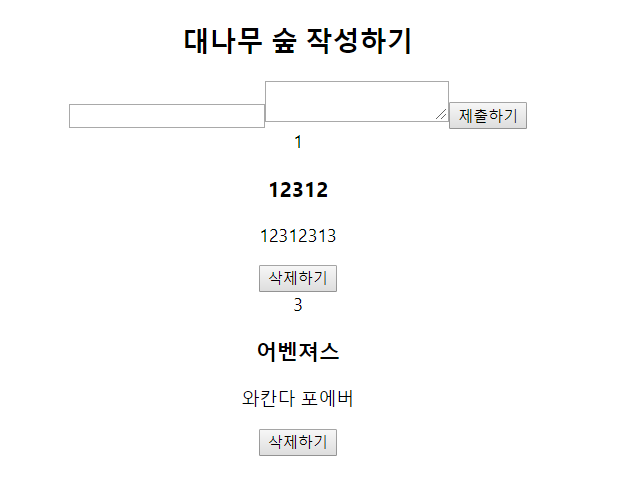
실행결과
하루를 기록하다